A Practical Guide to Using the CoinGlass Liquidation Heatmap for Stop Loss and Take Profit in Swing Trading
Introduction
Most traders set their stop loss and take profit based on classic technical levels — support, resistance, trend lines. This approach is time-tested and still works, but a more powerful tool exists that most retail traders either do not know about or do not use correctly: the liquidation heatmap.
The CoinGlass liquidation heatmap shows you exactly which price levels hold the largest concentration of stop losses from other traders. This tells you where price is being pulled — not because of technical analysis, but because of liquidity magnetism. Markets move toward liquidity. When you know where these pools are, you can place your stop loss where it makes structural sense — not where it will get hit accidentally by a routine stop hunt.
Why the Heatmap Matters More Than Classic Technical Levels
In traditional technical analysis, you place your stop loss below a support level. The problem is that everyone does this — and market makers know it. The result: price frequently hits precisely the level where the most stop losses cluster, clears them, and then reverses. This is what we call a Stop Hunt or Bear Trap.
The heatmap shows you this before it happens. When you see a Yellow & Green Mixed or pure yellow zone below the current price, it means a large concentration of long stop losses is sitting there. Price has a high probability of reaching that zone to absorb the available liquidity. Your job is to position your stop intelligently relative to these zones — not where everyone else has placed theirs.
Step One — Choose the Right Module
Go to CoinGlass. From the main menu click Liquidation, then select Liquidation Heatmap. Note that this is different from the Liquidation Map. The Heatmap shows where stop losses are concentrated ahead of time. The Liquidation Map shows liquidations that have already happened. This distinction is critical — you want forward-looking data, not historical.
Step Two — Select Symbol and Data Source
Type your symbol in the search bar. For complete market data, always select Aggregated — not Binance only. The reason: for BTC and ETH, more than sixty-five percent of volume trades on other exchanges such as OKX, Bybit, and Deribit. If you only look at Binance, you are seeing an incomplete picture of where liquidity actually sits.
Exception: for altcoins where seventy percent or more of volume is concentrated on one exchange, that exchange alone is sufficient.
Step Three — Set the Timeframe
For swing trades held between one and twenty days, set the timeframe to 1 Month. This choice is optimal for three reasons:
• Levels formed in the past thirty days are still active and have not yet been cleared by price
• Older levels (three to six months) are often no longer valid for precise stop placement because many have already been swept — though they remain useful for identifying large macro pools that may still be intact
• Very recent levels (one week) do not provide enough structural depth for strategic entries
For identifying TP2 and larger macro targets, also check the 3 Month view — but use it only for locating heavy macro pools, not for setting your stop loss.
Step Four — Set the Liquidity Threshold
This is the most important setting. The Threshold determines how much liquidity concentration is displayed on the chart. The recommended range is 0.55 to 0.65.
If you set it too low (for example 0.30): the chart fills with minor zones and the significant levels get lost in the noise. If you set it too high (for example 0.80): only the very largest pools appear and the medium-sized zones — which are often the most relevant for stop placement — get filtered out. Start at 0.60 and adjust based on whether the chart looks too crowded or too empty.
Color intensity guide:
• Pure yellow: very heavy concentration — price is strongly attracted to this level
• Yellow & Green Mixed: heavy concentration ★ — the most important levels for stop and TP placement
• Green: moderate concentration — may be relevant depending on context
• Light blue: low concentration — generally ignore these
Step Five — Identify the Two Zone Types
Once the heatmap is configured, identify two categories of zones:
Long liquidity pools — below current price: These hold the stop losses of leveraged long positions. Price is pulled toward these zones. For a long position, place your stop loss 0.3 to 0.5 percent below the upper edge of the nearest heavy zone.
Short liquidity pools — above current price: These hold the stop losses of leveraged short positions. Upward price movement is attracted to these zones. For TP1, target the lower edge of the nearest heavy short zone — this is where resistance and reversal probability is highest.
Practical Example — BTC at $46,200
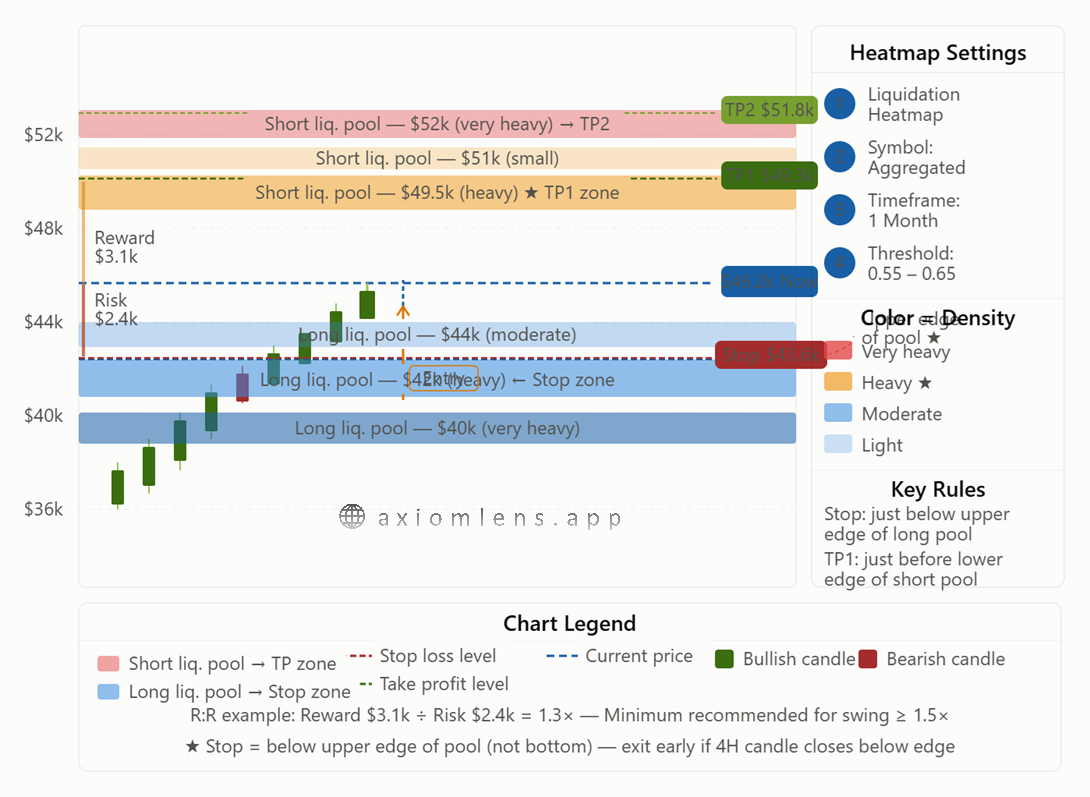
As shown in the diagram above, assume BTC is trading at $46,200 and you are considering a long position.
The one-month heatmap reveals:
Below price — long liquidity pools:
• Moderate pool at $44,000
• Heavy pool between $42,000 and $43,800 (upper edge: $43,800)
• Very heavy pool at $40,000
Above price — short liquidity pools:
• Small pool at $51,000
• Heavy pool between $49,300 and $50,500 (lower edge: $49,300)
• Very heavy pool between $51,800 and $52,500
Decision:
Stop loss: $43,800 minus 0.4% = approximately $43,625 — placed below the upper edge of the heavy long pool.
TP1: lower edge of the nearest heavy short pool = $49,300 — high probability of resistance and reversal here. Close 50% of the position.
TP2 (from the three-month heatmap): $51,800 — lower edge of the very heavy macro pool.
R:R calculation:
• Risk: $46,200 − $43,625 = $2,575 (5.6%)
• Reward to TP1: $49,300 − $46,200 = $3,100 (6.7%)
• R:R = 1.20×
This R:R is slightly below the minimum recommended threshold for swing trading (at least 1.5×). In this case, you have two options: wait for a pullback to the $44,500–$45,000 range for a better entry, or target TP2 at $51,800 as your primary exit — which would bring the R:R to approximately 2.2×, well within acceptable range.
A Key Note on the Smart Stop Placement Rule
The standard textbook approach places the stop below the bottom of the entire liquidity pool. The smarter approach places it just below the upper edge of the pool. The reasoning is straightforward: if price reaches the upper edge of a heavy long pool and a four-hour candle closes below it, the probability of continuation to the pool's full depth is high. Exiting at the upper edge rather than at the bottom means you lose less if the scenario plays out against you — and you avoid being held in a losing position while price sweeps through the entire zone.
Final Note — Check the Heatmap Every Morning
Liquidity levels are not static. Every day new traders open positions and the concentration maps shift. If you only check the heatmap on entry day and then ignore it, your stop and target may no longer reflect where liquidity actually sits a week later. A brief daily check — two to three minutes each morning — is enough to confirm that your active stop and TP levels are still structurally sound. Adjust them if a significant zone has moved.
Summary
The CoinGlass liquidation heatmap gives you the same information that large market participants work with — you can see where liquidity is pooled and where price is structurally likely to move. With the correct settings (Aggregated, one month, Threshold 0.60) and the two core rules (stop below the upper edge of the nearest heavy long pool, TP1 before the lower edge of the nearest heavy short pool), your trading decisions are anchored in real market structure — not support and resistance lines that every other trader is watching and getting stopped out at.
O. H.
Founder, AxiomLens